Email: info@grisprint.com / crystal@grisprint.com Phone: +8613249595563

Printhead Specifications


When to Choose Which Epson i3200 Printhead: A No-Fluff Guide for Integrators

Confused about Epson i3200-A1 vs U1HD vs E1? This no-fluff guide explains which model fits your ink type and application—based on real technical limits.
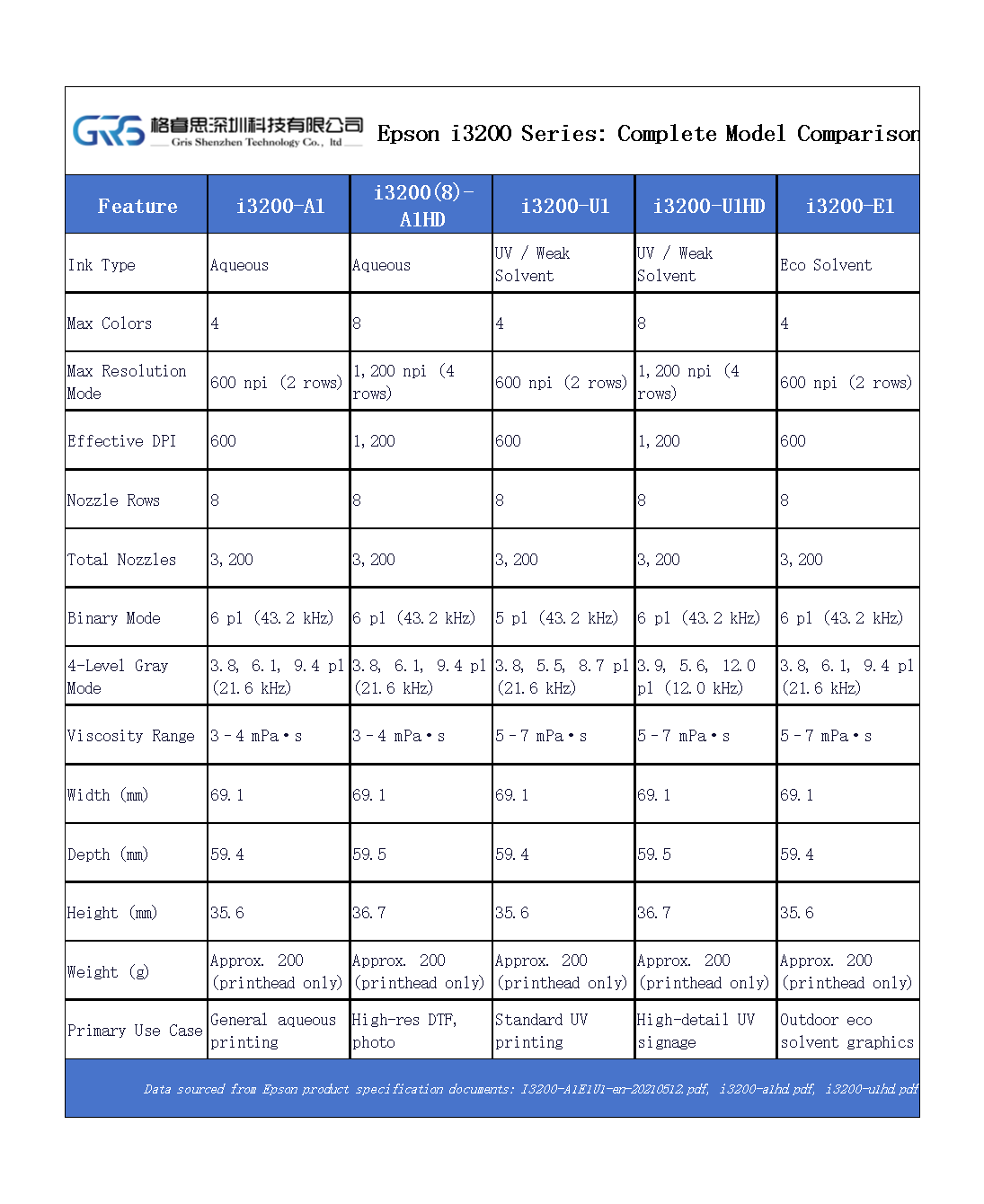
The Epson i3200 series shares the same mechanical dimensions (69.1 mm width, ~59 mm depth, ~36 mm height) and 3,200-nozzle layout across all variants. This makes physical replacement straightforward—but not all models are functionally interchangeable.
While your original post covers the key specs, this article explains how to match each model to real printing requirements, based on Epson’s official documentation and field experience from actual integrations.
image.png

1. i3200-A1: For Water-Based Ink Systems Only

  • Designed for: Aqueous pigment or dye inks.
  • Typical use: Indoor graphics, basic textile direct-to-fabric (non-DTF), proofing.
  • Important note: Not compatible with UV, solvent, or DTF white ink systems. Using it outside aqueous applications risks rapid nozzle degradation.
✅ Choose this if you’re building a low-cost water-based printer for paper or coated media.
❌ Do not use for DTF—even though some try—because it lacks the waveform control needed for reliable white ink jetting.

2. i3200(S)-A1HD: The DTF & High-Resolution Aqueous Option

  • Key difference: Supports higher effective resolution through multi-pass interlacing (marketed as “1,200 dpi class”).
  • Confirmed use cases: DTF transfer printing, fine-art aqueous output.
  • Reality check: The “HD” refers to drive electronics and waveform tuning—not more nozzles. It still has 3,200 nozzles like all i3200s.
✅ This is the only i3200 variant officially validated by Epson for DTF workflows when paired with compatible inks.
⚠️ Requires precise temperature and humidity control. Not ideal for high-speed single-pass.

3. i3200-U1: Standard UV / Weak Solvent

  • Ink compatibility: UV-curable and weak-solvent inks (typically <7 mPa·s viscosity).
  • Common applications: Indoor signage, packaging prototypes, industrial marking.
  • Limitation: Does not support grayscale mode—only binary (on/off) droplet firing.
✅ A solid choice for cost-sensitive UV printers where extreme detail isn’t required.
❌ Avoid for photo-realistic graphics—banding may appear in smooth gradients.

4. i3200-U1HD: Grayscale UV Printing

  • What “HD” means here: Enables 4-level grayscale (e.g., 7 pl, 10 pl, 12 pl, 14 pl droplets in one pass).
  • Result: Smoother tonal transitions, reduced visible dot patterns.
  • Used in: High-end UV flatbeds, backlit displays, premium décor printing.
✅ If your RIP supports variable dot placement and you need visual quality over speed, U1HD is worth the premium.
🔧 Note: Requires updated firmware and compatible drive electronics—verify with your motion controller vendor.

5. i3200-E1: Eco-Solvent Optimized

  • Special feature: Internal fluid path materials are resistant to eco-solvent chemical exposure.
  • Not just “U1 with different label”: The E1 uses different sealants and wetted components.
  • Typical deployment: Outdoor banner printers, vehicle wrap systems.
✅ The only i3200 variant rated for long-term eco-solvent use.
❌ Do not substitute with U1—even if it fits physically. Solvent vapors will degrade non-E1 seals over time.

Critical Reminder: Firmware & Electronics Matter

All i3200 variants require specific waveform data loaded via the printer’s controller. You cannot simply swap an A1 for a U1HD and expect it to work—even if the connector matches. Epson provides separate waveform files for each model, and using the wrong one can cause misfiring or permanent damage.
Always:
  • Confirm waveform compatibility with your printhead driver board.
  • Use genuine Epson heads (or authorized remanufactured units with verified chips).
  • Test with your exact ink formulation before full production.

Final Advice

Don’t choose a model because it’s “higher spec.” Choose it because it matches your ink chemistry, image quality target, and production environment. The i3200 platform gives you options—but only if you respect their design boundaries.

📌 Related Reading:
Original Comparison: Epson i3200 Series Printheads Model Comparison

CATEGORIES

LATEST NEWS

CONTACT US

Contact: Vicky Wei

Phone: +8613249595563

Email: info@grisprint.com / crystal@grisprint.com

Address: 809Room , 8F, lianchuang Business Center ,No.67 Gongye Road , Mingzhi Street , Longhua District . Shenzhen City . Guangdong Province . China .518110

Leave a message

Top